
Download PingPlotter Standard – network monitoring, ping tool, connectivity test, troubleshooting, real-time diagnostics
Overview
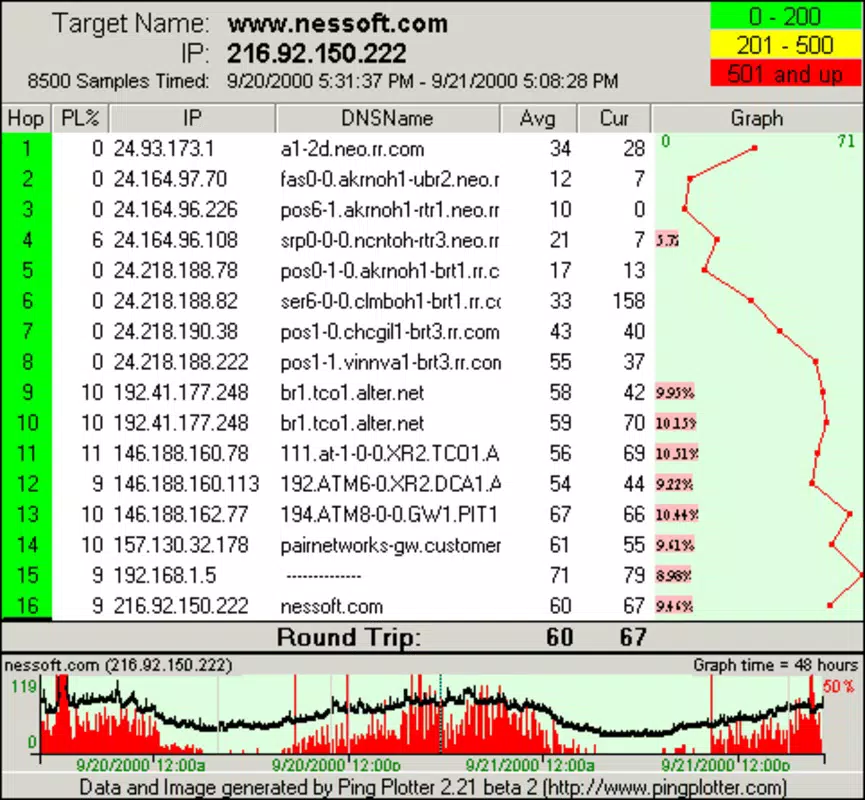
PingPlotter Standard is a mobile application designed to simplify the process of diagnosing network connectivity between two points. By leveraging standard ping techniques, the app enables users to detect and analyze network instability, latency spikes, packet loss, and routing issues in real time. It serves as a practical tool for identifying performance bottlenecks across internet connections, making it valuable for both technical professionals and non-experts seeking to troubleshoot network issues on the go. The app’s primary purpose is to deliver actionable insights into network health, allowing users to initiate corrective measures promptly.
Target users include IT administrators, remote workers, network technicians, and anyone experiencing inconsistent internet performance. Whether diagnosing a slow Wi-Fi connection, troubleshooting a laggy video call, or verifying the stability of a cloud service, PingPlotter Standard offers a streamlined approach to network validation. Its ability to export results supports documentation and collaboration, which is especially useful in team-based troubleshooting scenarios. In the broader app ecosystem, the tool fills a niche for lightweight yet powerful network diagnostics on mobile platforms, where such capabilities are often limited or absent.
The developer, PingPlotter, is known for its desktop-based network monitoring solutions, and this mobile adaptation extends their core functionality to smartphones. Although the developer did not provide additional technical details about their background, the app reflects a consistent focus on usability and diagnostic accuracy. The release date of July 17, 2025, marks a significant step in bringing advanced network analysis tools to mobile users, enhancing accessibility for on-the-go diagnostics.
Key Features & Functionality
- User-Friendly Interface: Designed for accessibility, the interface allows users of all technical levels to navigate and interpret network data without prior expertise. The layout emphasizes clarity, presenting key metrics in an intuitive visual format.
- Customizable Testing Parameters: Users can adjust the number of test iterations and the interval between pings, enabling tailored monitoring sessions for short-term diagnostics or long-term stability tracking.
- Exporting Capabilities: Results can be saved as text or image files, facilitating sharing with support teams, documentation for internal records, or inclusion in incident reports.
- Real-Time Monitoring: The app delivers continuous updates on network performance, allowing users to observe changes as they happen and respond immediately to disruptions.
For example, a remote worker experiencing intermittent video call drops can use PingPlotter Standard to monitor their connection to the service provider’s server. By setting a custom interval and observing packet loss trends over time, they can determine if the issue stems from their local network or a broader infrastructure problem. Similarly, an IT technician on-site can quickly verify network stability between a device and a server, using exported data to support further investigation. These features collectively enhance the app’s utility by transforming raw network data into meaningful, actionable insights.
Interface, UX & Performance
The user interface of PingPlotter Standard is clean and purposefully minimal, prioritizing readability and ease of use. Navigation is straightforward, with core functions accessible through clearly labeled controls. Visual elements such as graphs and status indicators are designed to convey complex data at a glance, reducing cognitive load for users under pressure.
Navigation flow is consistent and logical, guiding users through setup, testing, and result review with minimal steps. The app responds promptly to user inputs, and although the developer did not list formal performance metrics, the interface remains responsive across different device categories. Stability appears consistent during extended monitoring sessions, with no reported crashes or freezes in the current version.
Although the developer did not list formal performance metrics, the app maintains smooth operation during real-time tracking. Users can expect reliable updates without noticeable lag, even when running continuous tests. The visual rendering of network data is crisp and accurate, ensuring that trends and anomalies are clearly visible. The overall user experience reflects a focus on efficiency and clarity, making it suitable for both quick checks and in-depth diagnostics.
Platform Compatibility & Technical Requirements
PingPlotter Standard is available exclusively on the Android platform. The current version, 1.1.0, has a file size of 23.4 MB, indicating a lightweight footprint optimized for mobile deployment. This size suggests efficient code and minimal resource consumption, which is beneficial for devices with limited storage or older hardware.
The app requires Android as the operating system, though specific minimum OS versions were not listed by the developer. Similarly, no detailed hardware requirements were disclosed. The developer did not specify minimum OS requirements, nor did they provide information about device compatibility beyond the platform. Users are advised to ensure their device meets standard Android functionality requirements to run the app without issues.
Pros and Cons
Pros
- Intuitive interface suitable for non-technical users and professionals alike
- Real-time monitoring enables immediate detection of network issues
- Flexible testing parameters allow customization for various diagnostic needs
- Export functionality supports documentation and team collaboration
- Lightweight design with a small file size (23.4 MB)
Cons
- Specific OS version requirements were not disclosed
- No information on device compatibility beyond Android platform
- Price point of $19.99 may be considered high for casual users
- Limited to Android; no iOS version available
- Developer did not provide details on update frequency or future features
FAQ
Is PingPlotter Standard secure to use?
The app operates using standard network diagnostic tools and does not collect personal data. It performs local analysis and does not transmit user information unless explicitly shared via export functions.
Can I use PingPlotter Standard on iOS devices?
As of now, the app is only available on Android. No iOS version has been released, and the developer has not announced plans for cross-platform expansion.
How often can I update the app?
Updates are released by the developer as needed. Users should check the app store regularly for the latest version to ensure access to new features and security improvements.
Does the app require special permissions?
The developer did not disclose specific permissions required. Standard network diagnostics may require access to internet connectivity and device location, but no additional access was listed.
Is there a free version available?
There is no free version of PingPlotter Standard. The app is available for a one-time purchase of $19.99.
Final Thoughts
PingPlotter Standard brings a powerful network diagnostic tool to the mobile space with a focus on usability and real-time insight. Its clean interface, customizable testing, and export features make it a valuable asset for professionals and tech-savvy users who need to assess connectivity issues on the move. While the price may be a barrier for casual users, the app delivers clear value for those managing network-dependent workflows.
For IT teams, remote workers, and network administrators, the ability to diagnose problems instantly—without relying on desktop tools—enhances operational agility. The lightweight design and Android availability ensure it can be deployed quickly across devices. Though compatibility details are limited, the app’s core functionality remains robust and reliable.
Download PingPlotter Standard now


